
Image portfolios, iPads, field triage and Lightroom … and more

At long last I’ve had the time to work through a number of technology issues centering around my photography. This in no small part was enabled by having a week in mid-Wales with Nick Jenkins of Freespirit Images who led the photo workshop from a base at Llanerchindda Farm, and several conversations with Andrew Cooper who, apart from having a lot of the same gear as I have, is a definite kindred spirit when it comes to photographic geekery! Check out his website here.

So let’s start with Image Portfolios. I’ve been meaning for some time to get something together and have been wrestling with whether to put it online, or create something for the iPad. Andrew came up with the perfect solution – Foliobook Portfolio for the iPad – which is amazing and actually hits the online portfolio button as well – here’s the result of my work over the last couple of days – a gallery created from a number of my  Moments like these … images and posts. How does the workflow go … I never thought you’d ask!

The starting point is the Alloyphoto Lightroom plugin for Dropbox. I created a number of Smart Collections and one Collection Set with several more Smart Collections within the Plugin in the Publish Services Library module of Lightroom and then set about refining my image Ratings and Colour Labels, and updating my Keywording to select the images I wanted to go into each Smart Collection. Doing this carefully now means that whenever I rate, label and keyword an image in the future it will automatically update the Smart Collection and allow easy re-publishing to Dropbox.

Why Dropbox? Well yes – it would have been nice to use Google Drive, but Foliobook is built upon an infrastructure that relies on Dropbox to import photos to the iPad  other than using your iPad’s Camera Roll. So publish to Dropbox and then link the Category/Galleries you create in Foliobook to Dropbox folders and images, and the updating is almost painless and ridiculously easy … once you’ve got the hang of it. Thanks Andrew – a great piece of advice.

Incidentally, a secondary benefit of doing it this way, via Dropbox, is that I now have a screen saver for my MacMini and for my Apple TV that link to the same Dropbox folders. Really neat!

Next it’s the iPad and how can it be used “in the field” with Lightroom Mobile. In a couple of words, it can’t … at least not yet, or not the way I would like to use it. Here’s what’s I would like to do, what’s available, and then what the problem is.

I (and Andrew) would like to use a WD wireless My Passport hard disk, or in my case alternatively the 128Gb of storage on my new iPad Mini 4, to download our RAW images onto, do some edits and then synchronise them through Creative Cloud back to Lightroom Desktop. Unfortunately, this just isn’t possible – read this to understand why it isn’t possible. I can by selecting RAW+JPEG do the edits in Lr Mobile and synchronise those back to the Desktop as JPEGs but there’s no manageable solution yet (I’m not going to do this, even though I’ve tested it with a single image – and it does work) to tie these edits back to the RAW files when I upload them to Lr Desktop.

The problem is with both Apple, and Western Digital, the former becuse they insist that all developers only work through their Camera Roll, the latter because their software doesn’t allow you to transfer files from the hard disk into Camera Roll – I believe you have to ask their My Cloud software to do that, which is slow and clunky. So you’re stuck!

Things may of course change. I’m still looking forward to Apple moving away from Lightning adaptors to USB-C – as on the new MacBook – but they chose not to implement it on the new iPad Pro, so I’m not holding my breath. So for me, it’s still my trusty and heavy MacBook Pro that will continue to accompany me on photo trips.

However, if you’re working in JPEGs you could use the Camera Connector Kit (SD-card, or USB versions) to upload your images into Camera Roll and then use the excellent Lr Mobile software for edits and sharing to social media, or perhaps Snapseed.

Lots of words in this post – just had to be written though. Here’s an image from the end of the workshop to break up the text …

2015 - 1

… just in case you’re interested,  this is Llewellyn ap Gruffydd Fychan (not Darth Vader) and he stands in front of Llandovery Castle.

Genuinely excited over Apples this autumn

Yes, well, it’s been a good year with the James Grieve this year too and Jenny’s been kept very busy keeping up with the windfalls – we’ve now enough apple sauce and stewed apple to feed an army with apple crumble!

But, of course, I’m really talking about Apple’s September event and the announcements made about iPad, Apple Watch, Apple TV and of course the new iPhone 6s.

File:Iphone 6s.png - Wikimedia Commons

I can’t remember a set of announcements that (apart from the Apple Watch) I’ve been so excited about. I mean it! Whether that’s because I have an aging iPhone 4s and an iPad 2, or whether it’s because I’ve been waiting what seems ages for Apple to launch the new Apple TV – I can’t say. I do know I’ll be throwing ideas around in my mind for quite a while about the iPad , whilst I’m playing with the new iPhone 6s which I do intend to get.

The iPhone decision is quite easy to make. I decided to keep my 4s on iOS 7 – a good decision, it still works very well, and with a slimmed down set of apps there’s a good case to say – just keep going, use it as a phone, nothing else. However, for me, 3D Touch just looks like a huge step forward and I can see lots of developers making use of it and enhancing the experience of using the phone. Then there’s the new camera and it’s larger sensor. Live Photos looks really interesting and I’m already looking at Martin’s slo-mo videos taken on his iPhone 5/6 and thinking … that would be nice. So there you have it. I have to have iOS 9 and I have to have an iPhone 6s … but not the Plus – we are talking about a phone after all!!

So … the iPad. I made the decision to try iOS 8 on my iPad 2. Wish I hadn’t, it slowed down horribly and the experience is not relaxing as you wait as an app loads and wonder whether it’s going to, or not. So … I had made the decision NOT to bother to upgrade the iPad and to just use my MacBook Pro more, maybe upgrading that to a more portable MacBook next year, but two things have changed my mind, and left me with a dilemma that I think I’ve now resolved.

The children bought my mother a Kindle. Seeing it’s form factor and how easy it is for her to hold it in one hand made me realise that a smaller iPad COULD work for me. I’d always previously rejected the iPad Mini as I couldn’t see what it’s purpose was. This was even more the case when the iPhone 6 Plus came along, but it’s just too big to be a phone … isn’t it?

Then along comes the iPad Pro and suddenly something becomes really clear to me – there is a real use case for the iPad Pro. I can see myself watching videos, streamed media, editing photos on it and NOT on a MacBook … but not yet. It’s not the perfect device, and I’m not sure it ever will be until the Lightning connector is replaced by a USB-C connector. I’ve already blogged about this connector on the MacBook and I do seriously feel that this is the way forward for Apple.

When you’re taking pictures in RAW with a 36MP sensor, you’re talking about large files. I need to be able to save them on a portable disk if I’m going to take my iPad away on trips with me. I need a proper USB port to use and I don’t mean a Flash Drive. This storage also has to work with the software I’m using – Lightroom. So, I’m sorry, the iPad Pro will have to wait – even though it looks gorgeous and I’d love to have one.

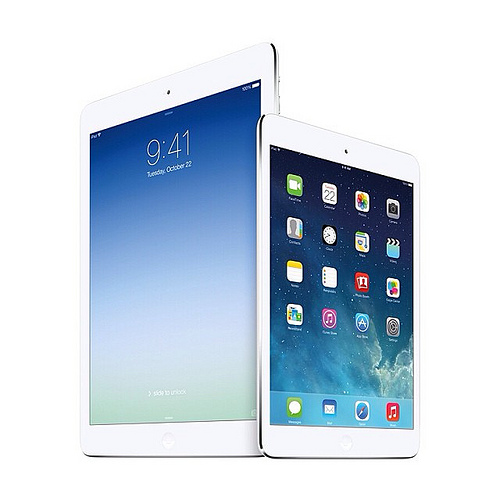
So, the real surprise of the Apple Event was the underplayed (understandably I suppose) announcement of the iPad Mini 4. The specification has been ramped-up, it looks a really good reader with the Retina screen and I can hold a glass of wine in one hand and the iPad in the other whilst of course controlling the Apple TV with it. I think I’m sold on this device – will give it a look later today and maybe, just maybe, I’ll buy it!

So, last but not least, the Apple TV. Now Apple has a platform to make things happen on. This looks a really exciting development with the hardware being given an operating system – TV OS – that will allow the creation of apps that will revolutionise watching TV in your living room. It’s a real game changer – I will definitely be buying the large memory version when it appears in the shops in November.

Finally, why nothing nice to say about the Apple Watch? I’m just not convinced. I actually don’t wear a watch very often these days – probably something due to me being retired. I can’t see anything in it I couldn’t do without. I freely admit to possibly being wrong, but I think I can wait a lot longer, perhaps forever, to be convinced.